AI Website Builder vs WordPress: Which Should You Pick?
AI website builder or WordPress? Compare real speed and market data, costs over three years, how easily you can move later, and which suits your site.

Pick an AI website builder if you need a small, simple site live quickly and want someone else to handle hosting, security and updates. Pick WordPress if you expect the site to grow, publish a lot of content, need specific features, or want the freedom to move hosts and developers later. Neither is “better”. A builder trades control for convenience, and WordPress trades convenience for control. One fact surprises people: on average, sites on some managed builders score better on Google’s speed measures than WordPress sites, because the builder controls the defaults.
We build WordPress sites, and this blog runs on WordPress. We still recommend a builder to some people who ask us, and this guide explains when.
Last reviewed: 7 November 2026. Market and speed figures change often; the dates are in the sources.
What counts as an “AI website builder”?
The phrase covers two quite different products, and mixing them up causes most of the confusion.
- Hosted builders with AI features. Platforms such as Wix and Squarespace, where you build in a visual editor and the platform handles hosting, security and updates for a monthly fee. By an “AI website builder” we mean this kind of platform when it uses AI to help draft your pages or design.
- AI app and site generators. Newer tools write actual code from your description, sometimes including a database and logins. They are closer to “vibe coding” than to a traditional builder, and they come with the security risks we covered in vibe coding security risks.
WordPress is different again. It is free, open-source software, licensed under the GPL, that you install on hosting you choose. You can design it yourself, use a theme, or have a developer build it. WordPress.com and similar services also offer hosted versions, which sit somewhere in between.
In this guide, “builder” means the first type: a hosted platform with AI help.
The quick answer
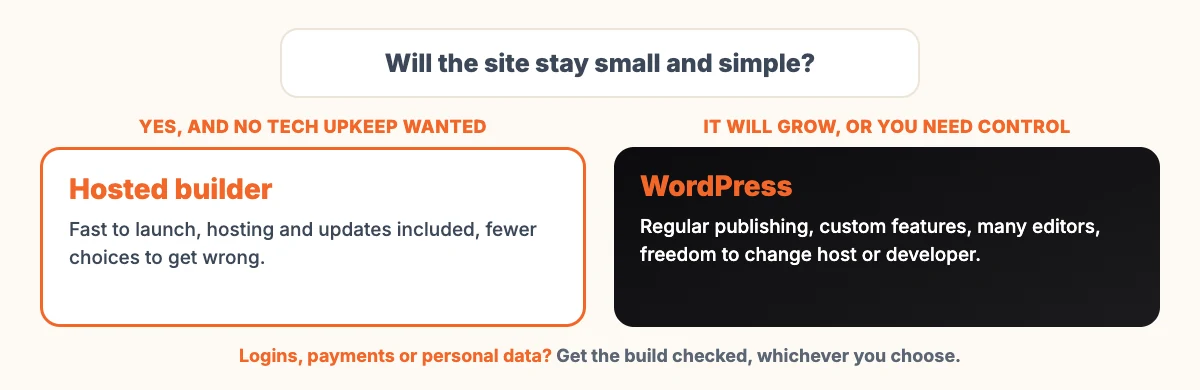
| Choose a hosted builder if… | Choose WordPress if… |
|---|---|
| You need 5 to 10 pages, live within days | You will publish regularly, such as a blog, resources or case studies |
| Nobody on your team wants to manage updates or hosting | You want to choose your own hosting and move it when you like |
| The design can follow a template closely | You need features no builder offers, or integrations with your own systems |
| You want one bill and one support desk | Several people need different editing rights |
| Moving away later is unlikely | You want the option to change developers without rebuilding |
What the numbers say
Two independent sources tell different stories.
Popularity. W3Techs, which tracks the technology used by websites, reported on 7 November 2026 that WordPress runs 39.4% of all websites, which is 58.2% of sites whose content management system it can identify. Shopify was at 5.3%, Wix at 4.2% and Squarespace at 2.4% of all websites. Popularity matters in practice: it means more developers, more themes, more plugins and more answers when something goes wrong.
Speed. The HTTP Archive’s Web Almanac 2025 compared how often sites on each platform pass Google’s Core Web Vitals on mobile. Platforms with tightly managed environments did best. Wix was at 74%, up from 55% the year before, while WordPress was at 45%.
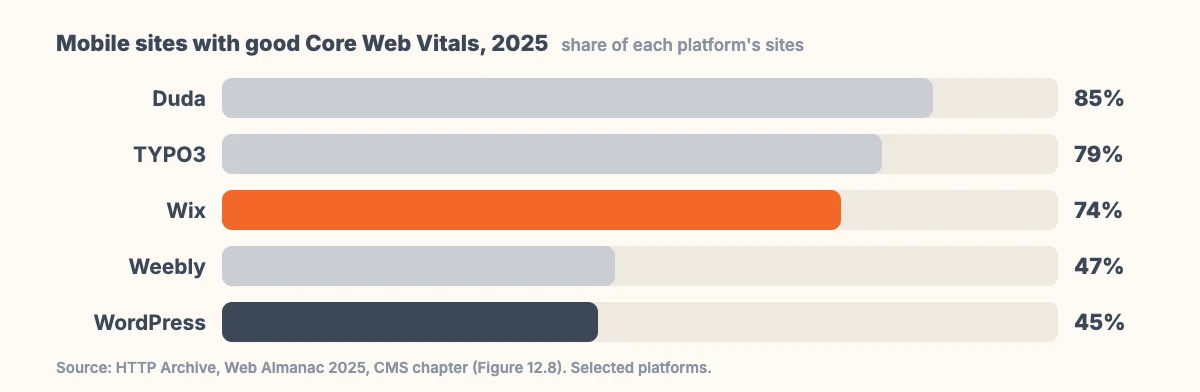
WordPress speed depends on choices: the theme, the hosting, how many plugins, and especially the page builder. The Almanac notes that page builders are a major contributor to performance variation across WordPress sites. A builder platform makes those choices for you, so its average is higher. A carefully built WordPress site can be fast. A WordPress site assembled from a heavy theme, a page builder and thirty plugins usually is not.
Accessibility shows a similar pattern. In the same report, median Lighthouse accessibility scores were 95 for Wix and 94 for Squarespace.
Our own example
When we rebuilt this blog in October 2026, it was a WordPress site carrying a heavy purchased theme, a page builder and 16 active plugins. We replaced the theme with a small custom one and removed everything the blog did not need. It now runs on 2 plugins: one for SEO and one for security. WordPress let us make those changes and keep every post and address. It also needed someone to do the work.
What does each really cost over three years?
We are not listing prices, because plans change often and vary by country and currency. These are the cost categories to put in your own spreadsheet.
| Cost | Hosted builder | WordPress |
|---|---|---|
| Software | Included in the subscription | Free, open source |
| Hosting and security | Included | Paid separately; quality varies widely |
| Design | Templates included; custom work costs extra | Free or paid themes, or a custom design |
| Extra features | Paid apps or higher plans | Free or paid plugins, or custom development |
| Online selling | Usually a higher plan, sometimes transaction fees | An ecommerce plugin plus payment gateway fees |
| Upkeep | Handled by the platform | Updates, backups and monitoring: your time or a paid plan |
| Leaving later | Often a rebuild | Usually a move, not a rebuild |
Can you move your site away later?
The two differ most here, so check this before you start.
- Wix says in its help centre that a Wix site must be hosted and run on Wix’s servers, and cannot be moved to another host, because it relies on Wix’s proprietary technology. It also states that the content you build belongs to you. In practice, leaving means rebuilding the site elsewhere and moving the content across.
- Squarespace lets you export certain content as an .xml file to import into WordPress. Its help centre notes that many features rely on its own code, so some content does not export.
- WordPress can export posts, pages, comments, categories, tags, custom fields and users as an XML file, which another WordPress site can import. The whole site, including files and database, can be moved between hosts. The GPL licence also guarantees the freedom to run, study, change and redistribute the software.
One rule applies whatever you choose: register your domain name in your own name and account. The domain is what people and search engines know you by. If someone else controls it, you do not fully control your website.
Checks that matter for any option
The platform matters less than these basics, and they are worth confirming before launch:
- Mobile speed. Check your key pages with Google’s Core Web Vitals in Search Console or PageSpeed Insights.
- Accessibility. Can the site be used with a keyboard, with a screen reader, and with text enlarged? The W3C’s introduction to web accessibility is a good, plain starting point.
- SEO basics. Editable page titles and descriptions, clean addresses, and redirects if you are replacing an older site. Our guide to redesigning a website without losing SEO covers that last point.
- Backups. Know how to restore the site, not just that backups exist.
- Content written by people who know the business. AI can draft pages quickly. Google does not penalise that by itself, but it does reward pages with something original to say, as we explained in does Google penalize AI content?
Six questions to answer before you choose
Write your answers down. They usually make the choice for you.
- What must the site do in two years, not just at launch? If the honest answer is “the same as today”, a builder is probably enough. If it involves bookings, member areas, several languages or a growing library of articles, lean towards WordPress.
- Who will update it, and how often? A busy owner editing a page twice a year needs simplicity. A marketing team publishing weekly needs roles, drafts and a proper editorial workflow.
- Who looks after it when something breaks? With a builder, the platform does. With WordPress, someone has to own updates, backups and security, either your team, your host or a developer.
- Does it need to talk to other systems? Billing software, a CRM, stock levels, a booking engine. Check that each connection exists before you commit, not after.
- Are you replacing an older site? If it has years of search traffic, plan redirects for every important address. Both options can do this; check how before you start.
- How would you feel if you had to move in three years? If that would be painful, weigh the portability section above heavily.
If your answers point both ways, start simple. A small, well-built site that launches this month beats an ambitious one that is still being planned next quarter.
When does it make sense to get help?
Plenty of businesses never need a developer, and a builder is the right call for them. Help is usually worth it when the site is central to how you win customers, when it needs to connect to your own systems, or when an old site with years of search traffic is being replaced.
If you are leaning towards WordPress, our WordPress development page explains how a build like this is usually scoped, and our older piece on the benefits of WordPress for business websites covers the basics. If you already have a site that is slow or dated, a website redesign may cost less than starting over. For a design-led project on any platform, see our website designing service.
Frequently asked questions
Is an AI website builder better than WordPress?
Not overall. A hosted builder is often better for a small, simple site that must go live quickly with no technical upkeep. WordPress is usually better for sites that will grow, publish regularly, need custom features or need to move hosts later.
Is WordPress slower than website builders?
On average, yes. In the HTTP Archive’s Web Almanac 2025, 45% of WordPress sites passed Core Web Vitals on mobile, compared with 74% of Wix sites. A well-built WordPress site with good hosting and few plugins can be fast; the average is pulled down by heavy themes and page builders.
Can I move a Wix site to WordPress?
Not directly. Wix says its sites must run on its own servers. You can move the content, such as text and images, but the site itself has to be rebuilt in WordPress. Plan the old-to-new page redirects so you keep your search traffic.
How many websites use WordPress?
W3Techs reported on 7 November 2026 that WordPress is used by 39.4% of all websites, or 58.2% of websites whose content management system it can identify.
Do AI website builders write good content?
They write a quick first draft, which can save time. It is usually generic, so rewrite it with your own services, prices, examples and answers to real customer questions, and check every fact before publishing.
Sources
- W3Techs, Usage statistics and market share of WordPress (checked 7 November 2026) and content management overview
- HTTP Archive, Web Almanac 2025, CMS chapter
- WordPress.org, About WordPress
- WordPress.org, Tools Export screen
- Wix Help Center, Exporting or embedding your Wix site elsewhere
- Squarespace Help, Export your site content (updated 9 October 2026)
- web.dev, Web Vitals
- W3C WAI, Introduction to web accessibility