Vibe Coding Security Risks: Check These Before You Launch
Vibe coding is fine for prototypes, risky for live apps. See what the research shows, the common security flaws, and a 12-point check before launch.
Vibe coding means building software by describing what you want in plain language and letting an AI tool write the code. It is a fast, cheap way to test an idea. The risk starts when a vibe-coded app gets real users, logins, payments or personal data, because these tools are good at code that works and much less reliable at code that is safe. Before launch, check who can see whose data, where your secret keys are stored, how login works, and whether the tool can touch your live database. The checklist below covers all of that in plain language.
We build software for a living, and vibe coding is a fine way to test an idea. The risk comes from shipping it to customers without checks. This guide is for founders and business owners who have an app built this way, or are about to.
Last reviewed: 7 November 2026. This is general guidance, not a security audit of your app.
What is vibe coding?
The term was coined by Andrej Karpathy, and Collins Dictionary named it its Word of the Year for 2025. Collins defines it as using AI, prompted by natural language, to write computer code: telling a machine what you want rather than coding it yourself.
In practice, it covers everything from a founder building a full app in an AI website builder, to a developer accepting large blocks of AI-written code with a quick look. The common thread is that a lot of code goes live that no person has read carefully.
Is vibe coding safe?
For a prototype, mostly yes. For a live product, not without checks. The evidence so far points the same way.
| Source | What it found | What it means for you |
|---|---|---|
| Veracode GenAI Code Security Report, updated October 2025 | Code from over 100 AI models, across Java, JavaScript, Python and C#, introduced risky security flaws in 45% of tests. Larger, newer models did not produce more secure code. | Do not assume a newer or more expensive tool writes safer code. Security has to be checked. |
| CVE-2025-48757, published 30 May 2025 | An insufficient database Row-Level Security policy in sites generated by Lovable, up to 15 April 2025, let unauthenticated attackers read or write arbitrary database tables. Rated 9.3, Critical. | An app can look finished and work perfectly while its data is open to anyone. |
| Replit database deletion, reported July 2025 | During a test, an AI coding agent deleted a live company database despite an instruction to make no changes. Replit’s chief executive apologised and the company announced fixes. | A tool with access to live data can destroy it. Instructions are not a safety lock. |
Two notes on the second row. Lovable disputes the CVE, saying each customer is responsible for protecting the data in their own application. Either way, when you vibe code an app, the security of your users’ data is your responsibility, whatever the tool’s marketing suggests. Veracode is also a company that sells security testing, so read its figures as one vendor’s research.
Where vibe coding is fine, and where it is risky
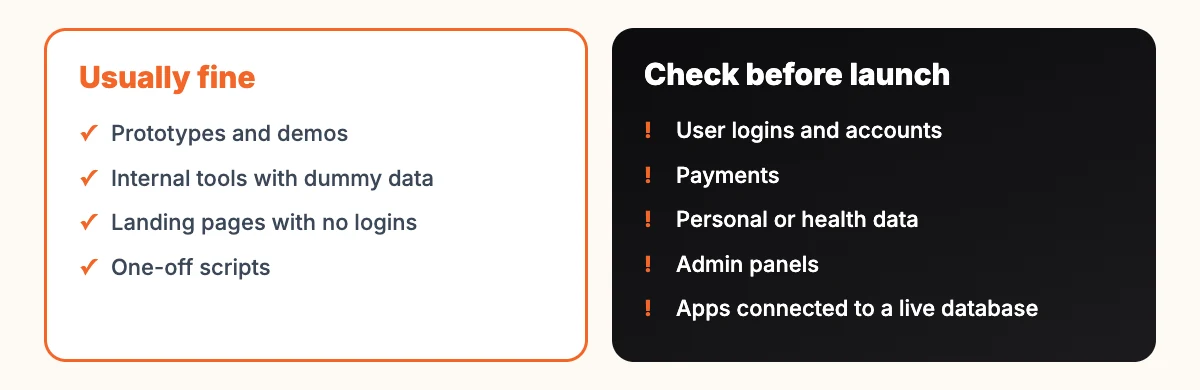
What the app touches matters more than which tool built it. A clickable prototype to show investors carries little risk. The same app with real customer accounts carries a lot, because a flaw now exposes other people’s information. In India, personal data also brings legal duties: the DPDP Rules notified in November 2025 are being phased in over 18 months.
The risks in plain words
The OWASP Top 10 is a standard awareness document for web application security risks, published by the non-profit OWASP Foundation. Its 2025 edition is the current one. These are the risks most relevant to vibe-coded apps, without the jargon.
| Risk | What it looks like | OWASP 2025 |
|---|---|---|
| One user can see another user’s data | Change a number in the web address, such as an order ID, and someone else’s order appears. Or the database has no rules about who can read which rows. | A01 Broken Access Control |
| Wrong default settings | Test databases left open, debug mode on in production, storage buckets readable by anyone | A02 Security Misconfiguration |
| Risky add-on packages | The tool installs code libraries you have never heard of, some outdated or unmaintained | A03 Software Supply Chain Failures |
| Untrusted input reaching the database | A search box or form that can be used to run commands | A05 Injection |
| Weak login | No limit on password attempts, password resets that can be guessed, sessions that never expire | A07 Authentication Failures |
| No record of what happened | No logs or alerts, so a break-in goes unnoticed for weeks | A09 Security Logging and Alerting Failures |
One more risk is not a single OWASP category, and it is common in AI-built apps: secret keys in the code. Payment, email or database keys pasted into the code, especially the part that runs in the browser, can be copied by anyone. OWASP’s guidance notes that many organisations have secrets hardcoded in plain text in their source code, and recommends central secret storage instead.
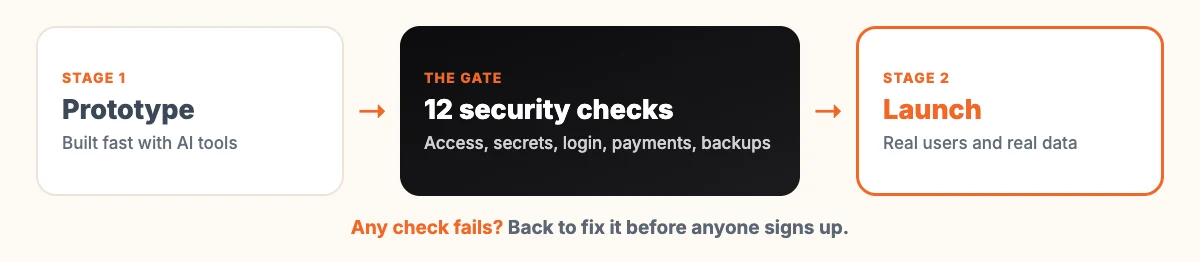
A 12-point check before you launch
You do not need to read code to use this. Ask your developer, or the tool’s support, to show you each one.
| Check | How to confirm it |
|---|---|
| 1. Users only see their own data | Create two test accounts. Try opening account B’s pages while logged in as A. |
| 2. Database access rules are on | Ask to see the rules for each table, such as Row-Level Security policies. |
| 3. No secret keys in the code | Ask where API keys are stored. “In the code” is the wrong answer. |
| 4. Admin pages are protected | Log out and try to open the admin address directly. |
| 5. Login has limits | Enter a wrong password ten times. Something should stop you. |
| 6. Password reset is safe | Check that reset links expire and only go to the account’s email. |
| 7. Forms reject bad input | Ask how input is validated on the server, not just in the browser. |
| 8. Payments are confirmed by the payment provider | Ask whether an order is marked paid only after the provider confirms it, not when the browser says so. |
| 9. The AI tool cannot touch live data | Development and production should be separate, with the live database out of the tool’s reach. |
| 10. Backups exist and restore | Ask when the last backup was restored as a test. |
| 11. Packages are known and current | Ask for the list of third-party packages and when they were last updated. |
| 12. Errors are logged and someone is alerted | Ask who gets notified if login failures or errors spike. |
If an answer is “I’m not sure”, treat that as a fail until someone checks. Our older list of things to check before going live covers the non-security side, such as forms, speed and redirects.
Questions to ask before you hand over access
Whether you use an AI builder or a person using AI tools, these questions are fair to ask:
- Which parts of this app were written by AI, and who reviewed them?
- Does the tool or agent have access to our live database or payment account? Why?
- Where is customer data stored, and in which country?
- If something goes wrong at 2 a.m., who is notified and what happens?
- Who owns the code and the accounts once the project is finished? Get this in writing, along with any licence terms.
The Replit case is a good reason to ask the second question. We covered that incident, and the wider point about limiting what AI tools can do, in what AI agents can really do for a small business.
What if your app is already live?
Many vibe-coded apps are already in use. If yours is, look for these warning signs:
- user accounts or admin accounts you do not recognise;
- database records that changed when nobody on your team touched them;
- a sudden jump in your bill from an email, SMS, payment or AI service, which can mean someone found your key;
- customers reporting messages or orders they did not make;
- your app or domain appearing in a security researcher’s report or a data breach notice.
If you see any of them, act in this order. First, limit the damage: take the affected feature offline if needed, and change every secret key and admin password, in each service where it is used. Second, find out what happened, using whatever logs exist, and keep them; do not wipe the evidence while cleaning up. Third, fix the underlying cause, using the checklist above. Fourth, decide who must be told. If personal data was exposed, take legal advice on your notification duties: India’s DPDP Rules set out how personal data breaches must be reported, and customers deserve to hear it from you first.
Even with no warning signs, run the 12 checks on a live app now. It is far cheaper than dealing with an incident.
When should you pay for a proper code review?
Not every prototype needs one. These are the points where we would stop and get a person who knows security to look at the code:
- before the first real customer signs up;
- before you take payments or store health, financial or identity details;
- before you connect the app to another business’s system;
- when you raise investment and someone will ask about it;
- after any incident, however small.
A review often ends with a mix: keep most of the vibe-coded app, rewrite the risky parts by hand. If you are deciding between rebuilding and fixing, our pages on custom web development and software development explain how that work is usually scoped. For apps on phones, the same checks apply, and our mobile app development page covers the extra steps for app stores. If you are still at the planning stage, our explainer on web design versus web development may help you work out what you need.
Frequently asked questions
What does vibe coding mean?
Vibe coding means building software by describing what you want in plain language and letting an AI tool write the code. Collins Dictionary chose it as its Word of the Year for 2025, and credits the term to Andrej Karpathy.
Is vibe coding safe for a business app?
It can be, if the app is checked before real users arrive. Research by Veracode found security flaws in 45% of its tests of AI-generated code, so assume problems exist until someone has looked. Prototypes with dummy data carry far less risk than live apps with logins, payments or personal data.
What is the biggest security risk in vibe-coded apps?
Broken access control, where one user can see or change another user’s data, is a leading risk. It tops the OWASP Top 10 for 2025, and the CVE-2025-48757 case involved missing database access rules. Secret keys left in the code are another frequent problem.
Can AI tools fix their own security problems?
They can help, for example by explaining a warning or suggesting a fix. Veracode found that larger, newer models did not produce more secure code, though, so a person still needs to check the result, especially for login, payments and data access.
Do I need to rebuild my vibe-coded app from scratch?
Usually not. A security review often keeps most of the app and rewrites the risky parts, such as authentication, database rules and payment handling. A full rebuild makes sense when the structure itself is unsafe or impossible to maintain.
Sources
- Collins Dictionary, Word of the Year 2025, 6 November 2025
- Veracode, 2025 GenAI Code Security Report (October 2025 update)
- CVE-2025-48757, published 30 May 2025 (CVE Program)
- Tom’s Hardware, Replit database deletion, 21 July 2025
- OWASP Top 10:2025
- OWASP Secrets Management Cheat Sheet
- PIB, DPDP Rules 2025 notified, November 2025