Core Web Vitals INP: What It Means and How to Fix It
Core Web Vitals INP explained: what Interaction to Next Paint measures, the 200 ms target, how to check it in Search Console and how to fix a slow INP.

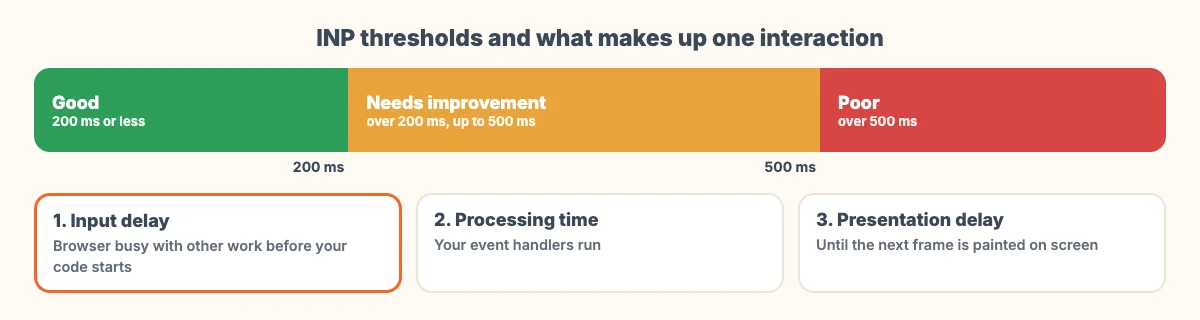
INP, short for Interaction to Next Paint, is the Core Web Vitals metric that measures how quickly your page responds when someone clicks, taps or types. Google’s web.dev guidance says an INP of 200 milliseconds or less is good, above 200 and up to 500 milliseconds needs improvement, and above 500 milliseconds is poor, measured at the 75th percentile of real visits. INP replaced First Input Delay (FID) as a Core Web Vital on 12 March 2024. If your site feels sluggish when people open menus, filters or forms, INP is the number that shows it, and the usual fix is less JavaScript blocking the browser at the moment people interact.
Last reviewed: 21 November 2026. Based on web.dev and Google Search Central; links are at the end.
| Core Web Vitals INP | In short |
|---|---|
| What it measures | Responsiveness to clicks, taps and key presses during a visit |
| Good | 200 ms or less |
| Needs improvement | Over 200 ms, up to 500 ms |
| Poor | Over 500 ms |
| Measured at | 75th percentile of real page loads, mobile and desktop separately |
| Replaced | First Input Delay (FID), on 12 March 2024 |
| Where to check | Search Console, Core Web Vitals report |
What is INP in Core Web Vitals?
Core Web Vitals are three measures Google uses to describe real-world page experience: Largest Contentful Paint (LCP) for loading, Interaction to Next Paint (INP) for responsiveness, and Cumulative Layout Shift (CLS) for visual stability. Google Search Central says it highly recommends that site owners achieve good Core Web Vitals “for success with Search and to ensure a great user experience generally.”
web.dev explains that INP looks at the click, tap and keyboard interactions during a visit and reports a single value that nearly all interactions were faster than. When someone taps “Add to cart”, opens a menu or types in a search box, how long until the screen shows that something happened? A good INP means the page reacts almost at once. A poor one means people tap twice, think the site is broken, or leave.
How does INP fit with LCP and CLS?
All three Core Web Vitals use the same rule: a page passes when it meets the target at the 75th percentile of real page loads, on mobile and desktop separately. web.dev gives these targets:
| Metric | What it measures | Good target |
|---|---|---|
| Largest Contentful Paint (LCP) | How fast the main content loads | Within 2.5 seconds |
| Interaction to Next Paint (INP) | How fast the page responds to taps, clicks and typing | 200 milliseconds or less |
| Cumulative Layout Shift (CLS) | How much the layout jumps around while loading | 0.1 or less |
A page can load quickly and still have a poor INP, for example when a large script finishes loading just as someone tries to open the menu. That is why INP needs its own checks.
How is INP different from FID?
First Input Delay measured only the delay before the browser started handling the first interaction on a page. INP covers every interaction during the visit and includes the whole time until the next frame is painted. The web.dev team announced that INP would replace FID as a Core Web Vital on 12 March 2024, and that FID would be deprecated. If an old audit report still talks about FID, its advice on responsiveness is out of date.
What causes a poor INP?
web.dev breaks each interaction into three parts. The input delay is the wait before your code starts, often because the browser’s main thread is busy with something else. Processing time is how long your event handlers take. Presentation delay is the time until the browser paints the next frame. A slow INP comes from one or more of these.
On business websites the usual culprits are:
- Too much JavaScript running at once, especially while the page is still loading, which creates long tasks that block the main thread.
- Third-party scripts such as chat widgets, tag managers, heatmaps and ad pixels competing for the same main thread.
- Heavy event handlers, for example a filter that re-renders a whole product list on every click.
- Layout thrashing, which web.dev describes as code that updates styles and then immediately reads them back, forcing the browser to work out the layout again and again.
- Page builders and sliders that can load large scripts on every page, whether or not they are used there.
How do you check INP for your website?
Start with Google Search Console. Its Core Web Vitals report uses real-world usage data and groups similar URLs by status (Poor, Need improvement, Good) for LCP, INP and CLS, separately for mobile and desktop. Google notes that it shows a sample of pages rather than every indexed URL, and that a “No data available” screen means there is not yet enough real-user data for that device type.
Then find the slow interaction. Open the page on a phone, try the menu, filters, tabs, search and forms, and note what feels slow. Your developer can reproduce it in Chrome DevTools’ Performance panel, which shows long tasks and layout work for each interaction.
How to fix a slow INP
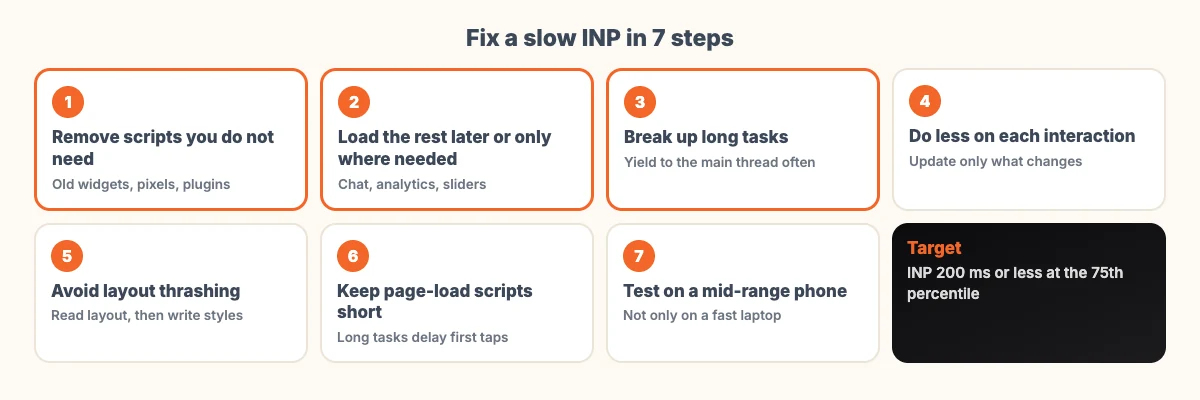
- Remove scripts you do not need. Every unused widget, pixel or plugin script is work the browser does for nothing.
- Load the rest later, or only on the pages that need them; a chat widget does not need to run on every page.
- Break up long tasks. web.dev recommends yielding to the main thread often, splitting work in event callbacks into separate tasks so the browser can respond in between, for example with
setTimeout. - Do less work on each interaction: update only the part of the page that changes, and show quick feedback, such as a pressed button state, before heavy work.
- Avoid layout thrashing: group style changes together and read layout values before writing new ones.
- Keep script evaluation during page load short, because long tasks at startup delay the first taps.
- Test again on a mid-range Android phone, not only on a fast laptop.
Fixing INP on WordPress sites
On WordPress, INP problems often come from the plugins added to a site. Check which plugins add scripts to every page, replace heavy page-builder widgets such as sliders and animated counters where you can, load chat and analytics tools after the page has settled, and keep the theme and plugins updated. Test each change on a copy of the site, because combining and delaying scripts can break forms or checkout if done carelessly.
How long does it take for INP to improve in Search Console?
The Core Web Vitals report uses real-user data, so improvements show only after enough visitors have used the updated pages. Expect a delay before the report moves, and do not judge a fix by a single lab test.
Questions to ask your developer
- Which pages and which interactions are slow, according to Search Console and real testing?
- Which third-party scripts load on every page, and which can we remove or delay?
- Are there long tasks during page load, and what causes them?
- How will you test the fix on a mid-range phone?
- How will we stop new plugins or scripts from making INP worse again?
Getting help
Our website development page explains how we build sites with speed in mind, and WordPress development covers clean-ups of slow WordPress sites. Third-party scripts also bring security risks; our guide to Content Security Policy covers how to control them. For the other Core Web Vitals targets and the pages a company site needs, see our guide to corporate website design, and if you are budgeting a rebuild, website development cost in India.
Frequently asked questions
What is a good INP score?
According to web.dev, 200 milliseconds or less is good, above 200 and up to 500 milliseconds needs improvement, and above 500 milliseconds is poor, measured at the 75th percentile of real page loads.
When did INP replace FID?
INP replaced First Input Delay as a Core Web Vital on 12 March 2024, and FID was deprecated.
Does INP affect Google rankings?
Google Search Central says it highly recommends achieving good Core Web Vitals for success with Search and for a good user experience. Core Web Vitals are one part of page experience, alongside helpful, relevant content.
How do I check my site’s INP?
Open the Core Web Vitals report in Google Search Console, which groups URLs as Poor, Need improvement or Good using real-user data. Then test the slow pages on a phone and in Chrome DevTools to find the slow interaction.
What is the most common cause of poor INP?
Long tasks on the browser’s main thread, usually from too much JavaScript, including third-party scripts, running when people try to interact. Breaking up long tasks and removing or delaying scripts are the usual fixes.
Sources
- web.dev, Interaction to Next Paint (INP) (checked 21 November 2026)
- web.dev, Web Vitals (thresholds for LCP, INP and CLS)
- web.dev, Optimize Interaction to Next Paint
- web.dev blog, INP becomes a Core Web Vital on March 12 (31 January 2024)
- Google Search Central, Understanding Core Web Vitals and Google search results
- Search Console Help, Core Web Vitals report