Website Development Cost in India: What Drives the Price
What decides website development cost in India: pages, platform, features, content and yearly costs, plus 12 questions to ask before you accept a quote.

Website development cost in India depends mainly on five things: how many distinct page designs you need, whether you need features beyond pages (bookings, logins, online payments), which platform it is built on, who writes the content, and what it costs to run each year after launch. Two quotes for “a website” often describe different work, so the way to compare them is to make every agency price the same written scope, and to ask for the yearly running costs as well as the build price.
This guide has no price bands, because a band copied from the internet says nothing about your project. It covers what moves the price, which costs come back every year, and the questions that make quotes comparable.
Last reviewed: 15 November 2026. Third-party fees change; the dates are in the sources.
Why do website quotes in India vary so much?
Because “website” covers very different jobs. A five-page site for a clinic and a store with 2,000 products, a payment gateway and a stock sync with billing software are both called websites. Even for the same brief, agencies make different assumptions about how many design rounds you get, whether content is included, whether the site is built on a ready theme or designed from scratch, and how long support lasts after launch.
Most surprises come from what a quote leaves out. Domain, hosting, email, paid plugins, stock photos, copywriting, data entry and yearly maintenance are often billed separately, or not mentioned at all until you need them.
What decides website development cost
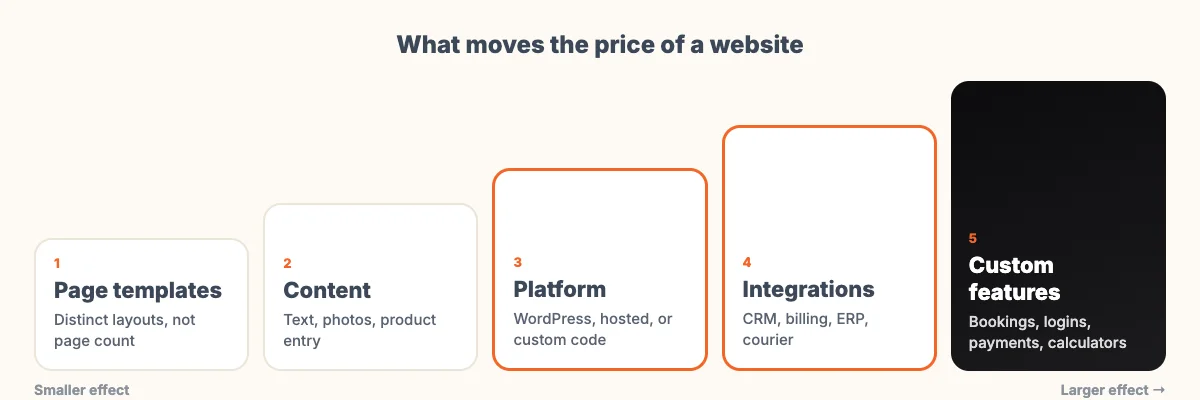
| Cost driver | What raises it | What keeps it down |
|---|---|---|
| Page templates | Many pages with different layouts | A few templates reused across pages |
| Design | A custom design from a blank page, many revision rounds | A well-chosen theme adapted to your brand |
| Platform | Fully custom code where a ready platform would do | WordPress or a hosted platform for standard needs |
| Features | Bookings, member logins, calculators, multiple languages, online payments | Contact forms and a click-to-call or chat link |
| Integrations | Connections to a CRM, billing software, ERP or courier | Exporting data by hand until volumes justify a connection |
| Content | Agency writes all text, shoots photos, enters hundreds of products | You supply final text and images on time |
| Speed and accessibility work | Heavy themes that need fixing later | Building to Google’s speed thresholds from the start |
Pages and templates
Agencies rarely price per page any more. What costs time is each distinct layout: a home page, a service page, a blog post, a contact page. Twenty service pages that share one template cost far less than twenty pages that each look different. When you ask for a quote, say how many types of page you need, not only how many pages.
Platform
For most business sites the choice is between WordPress, a hosted platform such as Shopify or Wix, and custom code. WordPress itself is open-source software licensed under the GPL and costs nothing to use. You pay for hosting, the theme or design, any paid plugins, and the work. Hosted platforms charge a monthly subscription that includes hosting. Custom code makes sense when your process does not fit any ready platform, and it costs the most to build and to change later. We compared the first two options in hosted website builder or WordPress.
Features and integrations
Each feature needs its own design, build and testing, and someone has to look after it once it is live. A booking calendar, a members’ area and a price calculator are three separate pieces of work, each with its own line on the quote. Integrations with your CRM, billing software or courier save staff time, but only once order or lead volumes are high enough to justify them.
Anything that takes payments, logins or personal data also needs security work and testing. Our checklist of things to check before going live covers the basics.
Content
Content is easy to leave out of a budget. Someone has to write the text, choose or shoot the images, and enter products or listings. If the agency does it, it costs money. If you do it, it costs time, and content that arrives late often delays the launch. Decide early who writes what.
Costs you pay every year
The build price is paid once. These keep coming, and a fair comparison adds three years of them to each quote.
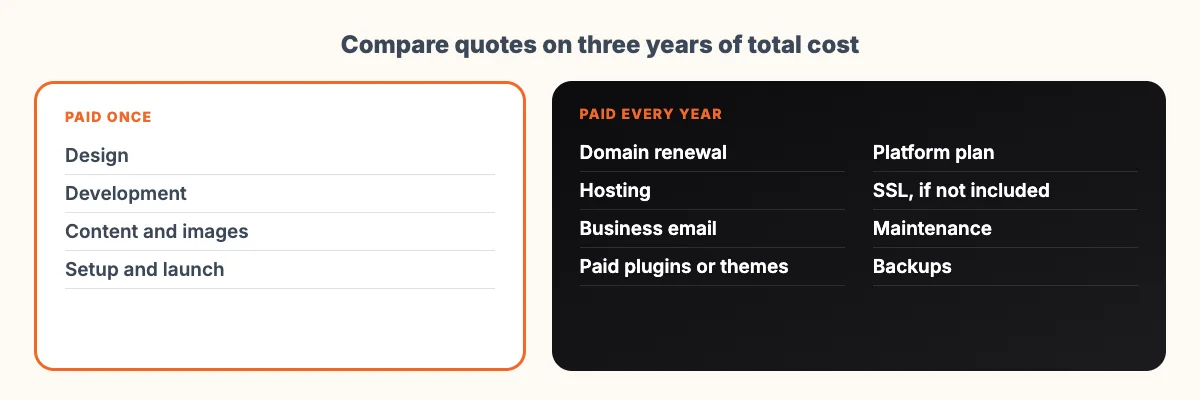
- Domain name. A .in address is sold by registrars accredited by NIXI, the registry for .in. On 15 November 2026 the registry’s published tariff to registrars was ₹500 a year for a .in name and ₹400 for names such as .co.in. Registrars set their own retail prices above that, and renewal prices are often higher than the first year, so check the renewal price before you buy. Register the domain in your own name and account.
- Hosting. Shared, cloud or managed hosting differ widely in speed, support and backups. On a hosted platform this is part of the subscription.
- Business email. Usually billed per user per year, separately from hosting.
- Paid plugins, themes or apps. Many are yearly licences that stop receiving updates if not renewed.
- Maintenance. Software updates, backups, security monitoring and small edits. A site nobody updates becomes slow and insecure. Our older post on website maintenance tasks lists what that work involves.
What Google expects affects the budget too
Google says it uses the mobile version of a site’s content for indexing and ranking. Mobile layouts therefore belong in the first scope, and a site that only looks right on a laptop will need more work later.
Google also measures real visitors’ experience with Core Web Vitals. Its web.dev guidance sets “good” as loading the main content within 2.5 seconds, responding to taps and clicks within 200 milliseconds, and a layout shift score of 0.1 or less. Heavy themes and stacks of plugins make these targets hard to meet, and fixing a slow site later usually costs more than building it lean.
Accessibility also affects the scope. A site that works with a keyboard, a screen reader and enlarged text reaches more customers. The W3C’s introduction to web accessibility is a plain starting point, and the current technical standard is WCAG 2.2.
If your forms collect names, phone numbers or other personal data, India’s Digital Personal Data Protection law applies. The DPDP Rules were notified on 14 November 2025 with an eighteen-month phased rollout, so consent wording and data storage on forms are now part of a proper build. We cover the details in our DPDP compliance checklist.
Questions to ask before you accept a quote
Send the same list to every agency. The answers make quotes comparable and show who has thought about your project.
- How many page templates are included, and how many pages will you build?
- How many design concepts and revision rounds are included?
- Which platform, theme and paid plugins will you use, and who pays their yearly renewals?
- Who writes the content, sources images and enters products?
- Does the price include GST?
- Are domain, hosting, email and SSL included, and in whose name are they registered?
- What is the payment schedule, and what is due at each milestone?
- What happens after launch: how long is free support, and what does maintenance cost each year?
- What do I receive at handover: admin access, login details, documentation, and on what licence terms?
- If I am replacing an old site, are page redirects included so search traffic is kept?
- Will the site be tested on phones and against Core Web Vitals before launch?
- What is not included?
Read the answer to the last question carefully. A low quote with a long “not included” list can end up costing more than a higher one that covers everything.
Handover terms differ between agencies. Some hand over the code. Others, including us, keep the code and give the client a lifetime licence to use the site on their domain, with full admin access and documentation. Ask which one you are getting, and get the terms in writing before work starts.
When a full custom build is not worth it
If you need a few pages that explain what you do and help people call or message you, a custom design and custom code are hard to justify. A good theme, or a hosted builder, with well-written content will serve you better, and the money saved is better spent on photos, copy and a year of maintenance. Spend on custom work when the site does a job no ready product does well: a quote calculator for your pricing, bookings tied to staff calendars, or a link to your own billing software.
The opposite mistake also happens. Some businesses start on the cheapest possible option for a site that has to sell online, then pay for a rebuild within a year. If online sales are the plan, scope for them from the start.
How to keep the cost under control
- Write a one-page brief: what the site must do, who it is for, which pages, which features, and three sites you like and why.
- Split the project into a first release and a later phase. Launch with what earns or saves money now.
- Have your text ready before design starts.
- Agree on the number of revision rounds, and gather feedback from everyone in your team into a single list per round.
- Budget for the first year of running costs on the day you approve the build.
If you are replacing an existing site, our guide to redesigning a website without losing SEO explains how to protect the traffic you already have.
Getting a quote
Our website development page explains how we scope a project, and the website designing page covers design-led work. If you plan to sell online, see ecommerce website development, and for sites that need features no platform offers, custom web development. Whoever you ask, send the twelve questions above with your brief.
Frequently asked questions
How much does website development cost in India?
It depends on the scope: the number of page templates, design work, platform, features such as bookings or payments, integrations, and who supplies the content. Ask several agencies to price the same written scope, and add three years of running costs such as domain, hosting, email and maintenance to each quote before you compare.
What yearly costs does a website have after launch?
Domain renewal, hosting, business email, renewals for any paid plugins, themes or platform plans, and maintenance such as updates, backups and security monitoring. On a hosted platform, hosting is part of the monthly or yearly subscription.
How much does a .in domain cost?
NIXI, the .in registry, published a tariff to registrars of ₹500 a year for a .in name and ₹400 for names such as .co.in (checked 15 November 2026). Registrars set their own retail prices above this, and renewal prices often differ from the first year.
Is WordPress cheaper than a custom website?
Usually, for standard business sites. WordPress is free open-source software, so you pay for hosting, design, any paid plugins and the work. Custom code costs more to build and change, and makes sense only when your process does not fit a ready platform.
Should a website quote include GST?
Ask whether the quoted price includes GST or adds it on top, and get the answer in writing. When comparing quotes, compare them on the same basis.
Sources
- NIXI .IN Registry, Tariff (checked 15 November 2026)
- NIXI .IN Registry, Accredited registrars
- WordPress.org, About WordPress
- Google Search Central, Mobile-first indexing best practices
- web.dev, Web Vitals (updated 31 October 2024)
- W3C WAI, Introduction to web accessibility
- W3C, Web Content Accessibility Guidelines (WCAG) 2.2
- PIB, DPDP Rules, 2025 notified, 17 November 2025