Google AI Mode and SEO: What Changes for Your Website
Google AI Mode and SEO: what AI Mode is, how it differs from AI Overviews, what Google says you need to appear, and how to measure the traffic.
Google AI Mode is a search experience where people ask a detailed question, get an AI-written answer, and can keep asking follow-up questions, with links to websites alongside. For SEO, Google’s own guidance is clear: there are no extra requirements or special optimisations to appear in AI Mode. Your page needs to be in Google’s index and allowed to show a text snippet, and the usual SEO basics still apply. What changes is the kind of query AI Mode handles, which is longer, comparison-heavy questions, and how you should measure results, since AI Mode traffic is counted inside the normal “Web” data in Search Console.
Last reviewed: 21 November 2026. Based on Google Search Central and Google Search Help; links are at the end.
| Google AI Mode and SEO | In short |
|---|---|
| What it is | An AI search experience with follow-up questions and links to the web |
| Extra requirements to appear | None, according to Google |
| Technical condition | Page indexed and eligible to show in Search with a snippet |
| Special files or schema needed | No |
| Where traffic shows | Search Console Performance report, “Web” search type |
| How to limit use of your content | nosnippet, data-nosnippet, max-snippet or noindex |
What is Google AI Mode?
Google Search Help describes AI Mode as Google’s “most powerful AI search experience”, where you can ask anything, get an AI-powered answer, and keep going with follow-up questions, with links out to websites. It says responses rely on Google Search’s understanding of web information and are supported by web content, and that in some cases AI Mode shows a set of web links instead.
Google Search Central adds that AI Mode is “particularly helpful for queries where further exploration, reasoning, or complex comparisons are needed”, the kind of question that might previously have taken several searches.
How is AI Mode different from AI Overviews?
AI Overviews appear at the top of normal search results, and Google says they are shown only when its systems decide they add something to classic Search, so they often do not appear. AI Mode is a separate experience that people choose, built for longer conversations.
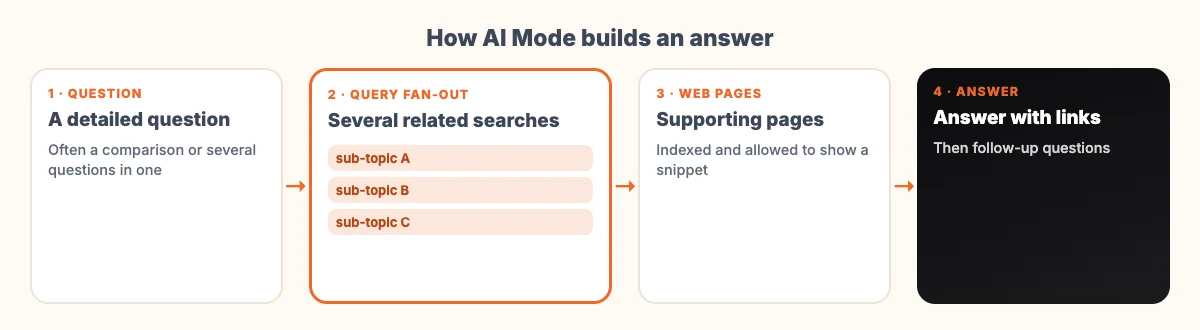
Both may use what Google calls “query fan-out”: running several related searches on different parts of the question and different sources, and picking up more supporting pages while the answer is being written. Google notes that the two work differently, so their answers and links can differ. We covered AI Overviews in detail in our guide to getting featured in Google AI Overviews.
| Point | AI Overviews | AI Mode |
|---|---|---|
| Where it appears | On top of normal results, for some queries | A separate mode people open |
| Best for | Getting the gist of a question quickly | Exploration, reasoning and complex comparisons |
| What comes next | A jumping-off point to explore links | Follow-up questions in the same conversation |
| How answers are built | May use query fan-out | May use query fan-out |
| Requirements for your page | Indexed, eligible for a snippet | Indexed, eligible for a snippet |
Do you need special SEO for AI Mode?
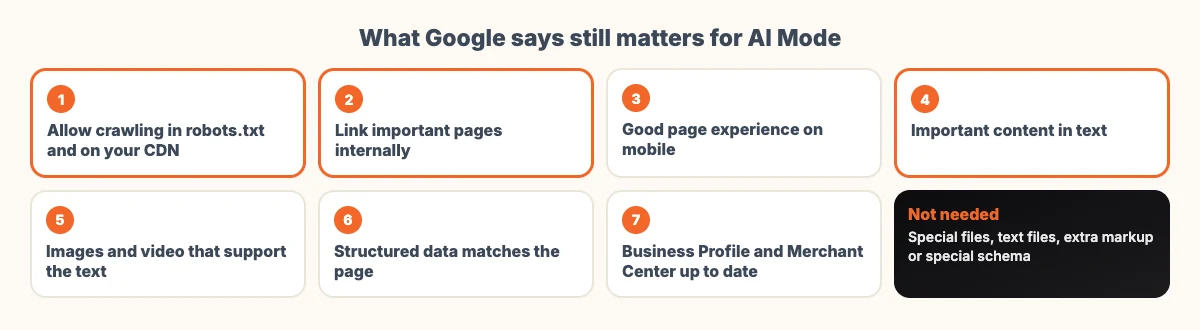
No. Google Search Central says: “There are no additional requirements to appear in AI Overviews or AI Mode, nor other special optimizations necessary.” Your page only needs to be in Google’s index, allowed to show a snippet, and meet the normal technical requirements for Search.
It also says you do not need to create “new machine readable files, AI text files, or markup”, and that there is no special schema.org structured data to add. If someone sells you a special file or markup “for AI Mode”, Google’s own documentation says it is not needed.
What helps your pages appear in AI Mode?
Google lists the SEO fundamentals that “continue to be worthwhile” for its AI features:
- Let Google crawl your site: check robots.txt, and make sure your CDN or hosting does not block Googlebot.
- Link your important pages from other pages on your site so they are easy to find.
- Give visitors a good page experience: fast, stable and easy to use on a phone.
- Put important content in text, not only inside images or videos.
- Support the text with good images and videos where they help.
- Keep structured data matching what is visible on the page.
- Keep your Google Business Profile and Merchant Center details up to date.
Because AI Mode handles longer, comparison-style questions, pages that answer those questions directly have more to offer it: comparison tables, clear pros and cons, “which should I choose” sections, specific numbers with sources, and FAQs written in the words customers use. Our guide to GEO vs SEO vs AEO explains how this kind of writing helps across answer engines.
How do you measure traffic from AI Mode?
Google says visits from AI features, including AI Mode, are counted with the rest of your search traffic in Search Console: look in the Performance report, “Web” search type. Google does not list a separate AI Mode filter there, so look at trends in clicks and impressions for the pages and queries you care about, especially longer, question-style queries.
Google also suggests tracking conversions and time on site in tools such as Google Analytics, and says that when people click from results pages with AI Overviews, the clicks tend to be higher quality, with visitors more likely to stay longer. Judge your pages by enquiries and sales from search, not by impressions alone.
Can you stop your content from appearing in AI Mode?
Google says AI is built into Search, so robots.txt rules for Googlebot are the control for how your site is crawled for Search. To limit what Search shows from your pages, including in AI features, Google lists four controls: nosnippet, data-nosnippet, max-snippet and noindex. These also affect normal search results, so use them carefully. Google adds that recrawling can take from several days to several months, so changes are not instant.
For limiting use in some of Google’s other AI systems, Google points to a separate control called Google-Extended; for Search itself, the controls above are the ones it lists.
Example: preparing a service page for AI Mode
As an illustration, take a clinic’s page for “teeth whitening in Noida”. Someone in AI Mode might ask: “Is teeth whitening safe, how long does it last, and what does it cost in Noida compared with at-home kits?” A page that only says “We offer the best teeth whitening” gives AI Mode nothing to use.
A stronger page answers each part in plain text: who it suits and who should avoid it, how long results usually last according to the dentist, the clinic’s actual price range, a short comparison table of clinic whitening versus at-home kits, and the dentist’s name and qualifications. Those are the details a longer, comparison-style question looks for.
What should you do differently because of AI Mode?
- Audit your main service and product pages: does each one answer the top five questions a buyer asks, in plain text?
- Add comparison content where customers compare, such as your product against alternatives or one plan against another.
- Back claims with specific numbers and named sources, and date your content.
- Keep company facts consistent on your website, Google Business Profile and listings.
- Measure enquiries from search in Analytics, not only rankings.
Google’s advice for AI Mode is the same SEO advice as before, with more weight on answering detailed questions well.
Getting help
Our SEO services page explains how we plan search work, and content writing covers the pages and guides that answer customers’ questions. For the November 2026 changes to Google’s rankings, see our guide to the Google core update 2026.
Frequently asked questions
What is Google AI Mode?
It is an AI search experience in Google Search where people ask detailed questions, get an AI-powered answer with links to websites, and can ask follow-up questions. Google says it is especially useful for exploration, reasoning and complex comparisons.
Do I need to optimise my website specifically for AI Mode?
No. Google says nothing extra is required for AI Overviews or AI Mode. Your page needs to be indexed and allowed to show a snippet, and normal SEO basics still apply.
Do I need special files or schema for AI Mode?
No. According to Google, you do not need new machine-readable files, special text files or extra markup, and there is no special schema.org type to add for these features.
How can I see AI Mode traffic in Search Console?
AI Mode traffic is included in the Performance report under the “Web” search type, together with other search traffic. Google does not list a separate AI Mode filter there.
How do I stop Google from using my content in AI Mode?
Google’s controls for this are nosnippet, data-nosnippet, max-snippet and noindex. These also affect normal search results, and changes take effect only after Google recrawls the page.