WhatsApp Business API in India: Pricing and Setup Explained
WhatsApp Business API pricing in India: per-message rates from 1 Oct 2026, app vs API, provider fees, opt-in rules and how to estimate your monthly bill.
WhatsApp Business API pricing in India is charged per delivered message, by message type. Meta’s list rates for India, effective 1 October 2026, are ₹0.8631 per marketing message and ₹0.115 per utility, authentication or service message, with 1,000 free service messages a month for each business phone number. Messages that customers send to you are free. On top of Meta’s charges, most businesses pay a provider for the software, setup and support, and those fees vary by provider. If you only chat with a few customers by hand, the WhatsApp Business app may be all you need.
This guide covers how the per-message model works, the difference between the app and the API, what a provider adds, the opt-in rules, and how to estimate your monthly bill.
Last reviewed: 15 November 2026. Meta changes its pricing and rules often; the dates are in the sources.
WhatsApp Business app or API: which do you need?
The WhatsApp Business app is built for small business owners. You install it on a phone, set up a business profile, show your products, and send greeting and away messages. Chats are typed by people, one at a time.
The WhatsApp Business Platform, usually called the API, is for businesses that need to send messages from their own systems: order updates from a store, reminders from a booking system, one-time passwords from a login screen, or replies handled by a team inbox. You use it through software, either your own or a provider’s.
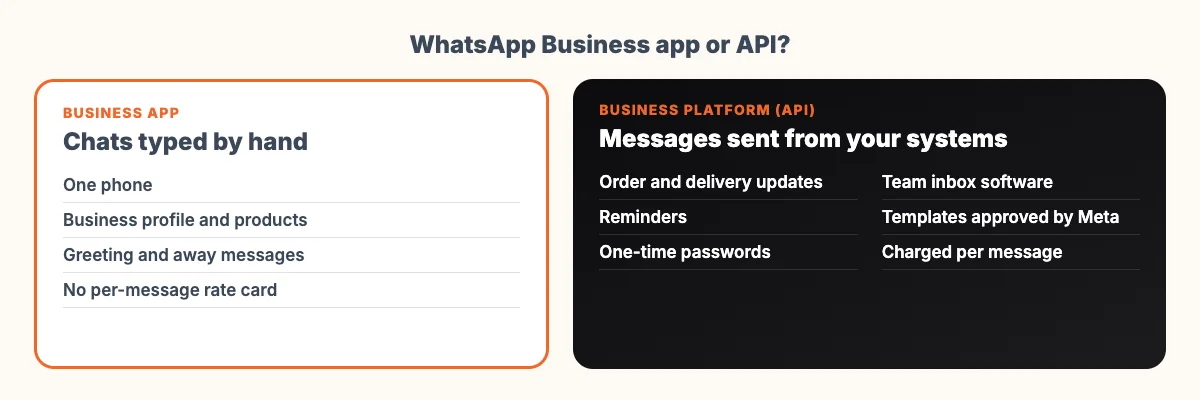
| You need… | App | API |
|---|---|---|
| To reply to customers by hand from one phone | Yes | Not needed |
| Automatic order, delivery or payment updates | No | Yes |
| One-time passwords for logins | No | Yes |
| Messages to customers who opted in, sent from your CRM or store | No | Yes |
| Meta’s per-message charges | Not on the rate card | Yes |
How WhatsApp Business API pricing works
Since 1 July 2025, Meta charges per delivered message. The older model, which charged per 24-hour conversation, is retired. Each message falls into one category, and each message is charged at most once.
The message categories
- Marketing: offers, product announcements, reminders to come back, and anything else that promotes the business. These need an approved template.
- Utility: updates about something the customer already did or asked for, such as an order confirmation, delivery update or appointment reminder. Template needed.
- Authentication: one-time passwords for logins and verification. Template needed. A higher international rate applies when the recipient’s number is from a different country.
- Service: free-form replies to a customer who messaged you. These can only be sent while the customer service window is open.
A customer service window opens for 24 hours each time a customer messages or calls your business, and each new customer message restarts it. Outside the window, you can only send approved templates.
India rates per message
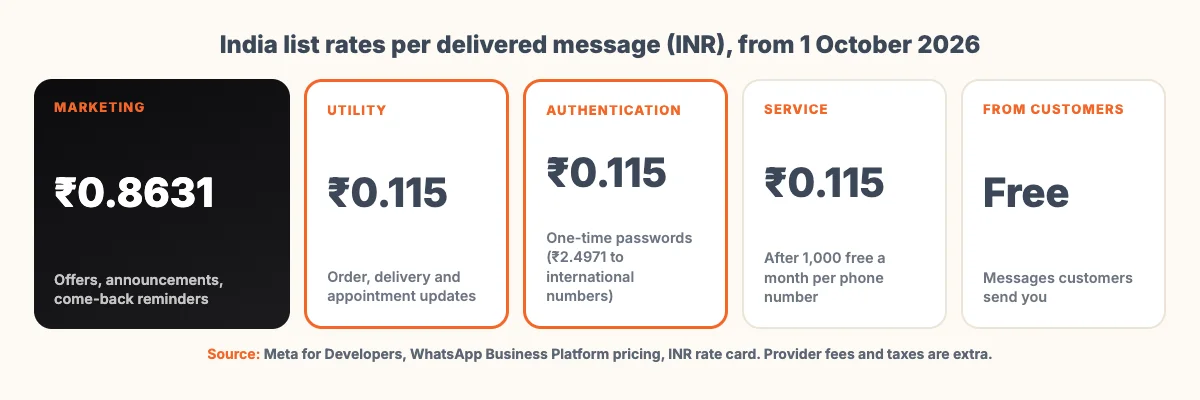
| Category | India list rate (INR per delivered message) |
|---|---|
| Marketing | ₹0.8631 |
| Utility | ₹0.115 |
| Authentication | ₹0.115 |
| Authentication, international number | ₹2.4971 |
| Service | ₹0.115, after 1,000 free a month per phone number |
| Messages from customers to you | Free |
These are list rates. Meta gives volume discounts on utility and authentication messages: the more you send in a month, the lower the rate. The tiers reset every month. Marketing messages have no volume tiers.
What changed on 1 October 2026
Service messages had been free since 1 November 2024, and utility messages sent inside an open customer service window since 1 July 2025. From 1 October 2026, Meta charges for both. Each business phone number gets 1,000 free service messages a month, and unused free messages do not carry over. If you planned your budget on the old free replies, check it again.
Click to WhatsApp ads still come with a free window. When a customer starts a chat by tapping one of these ads, a free entry point window opens for up to 7 days, and the marketing, utility, authentication and service messages you send in it are not charged.
Paying in rupees
Meta publishes India rates in INR. Billing in rupees for eligible businesses with an India billing address started on 1 January 2026, and those businesses must move all their messaging accounts to INR by 31 December 2026. The currency of an account cannot be changed once chosen, except through Meta’s migration process, so check this with your provider when you set up.
Estimating your monthly bill
Count your messages by category for a normal month, then multiply by the rate. An illustration, using list rates and before any provider fees or taxes:
| Messages in a month (illustration) | Rate | Meta charge |
|---|---|---|
| 2,000 order and delivery updates (utility) | ₹0.115 | ₹230 |
| 5,000 promotional messages (marketing) | ₹0.8631 | ₹4,315.50 |
| 800 replies to customer questions (service) | Within the 1,000 free | ₹0 |
| Total | ₹4,545.50 |
In this illustration, marketing makes up most of the bill, because the marketing rate is about 7.5 times the utility rate. Sending promotions only to people likely to respond lowers the bill, and message quality is also one of the things Meta looks at when it sets your sending limit.
What a provider adds, and what it costs
Most businesses reach the API through a provider. Meta calls them Business Solution Providers. They give you the inbox, template manager, campaign tools and integrations, and they help with setup and verification. You can also connect directly to Meta’s Cloud API and build your own tools, which makes sense when you have developers and specific needs.
Each provider sets its own prices. Before you sign, ask:
- Is Meta’s message charge billed by Meta directly, or passed through by you? If passed through, do you add a markup per message?
- What is the monthly or yearly platform fee, and how many team members does it include?
- Is there a setup fee?
- Which integrations are included: our store, CRM, billing software, payment links?
- Who owns the phone number and the WhatsApp Business account if we leave?
- Can we export our chat history and contacts?
- Do prices include GST?
If the provider controls your WhatsApp Business account, moving to another provider later is harder. Ask for the account to be created under your own Meta business portfolio.
Rules that affect cost and reach
Get opt-in before you message
Meta requires a customer’s permission before you message them. The opt-in can be general rather than specific to WhatsApp, but it must make clear that the person is agreeing to receive messages, and it must name your business. It also has to follow local law. In India, if your forms collect names and phone numbers, the DPDP rules on consent apply too. Our DPDP compliance checklist covers consent notices.
Templates need approval
Messages outside the customer service window use templates that Meta reviews. WhatsApp checks each template’s category against its content, so a template submitted as utility but containing a promotion is approved as marketing and charged at the marketing rate. It can also change the category of templates that are already approved.
New numbers start with a sending limit
A new business portfolio can send business-started messages to 250 unique people in a rolling 24 hours. Verifying your business, or sending enough high-quality messages, can raise this to 2,000 after a review by Meta, which then raises it further, up to unlimited, as you use at least half of your limit with good quality. Plan a launch campaign with this limit in mind.
When the API is not worth it yet
If your WhatsApp is a handful of customer chats a day, typed by one or two people, the app is enough, and the API adds software fees for little gain. The API pays off when messages should be sent by your systems, such as order updates and reminders, or when several staff need to share one number. If you are unsure, start with utility messages linked to your store or booking system. At list rates they cost ₹0.115 each.
Connecting WhatsApp to your CRM and store
The API is most useful when WhatsApp chats land in the same place as your other customer records, so a salesperson sees past orders and earlier chats in one screen. Our CRM development page explains how that kind of link is usually scoped, and digital marketing covers campaigns that use Click to WhatsApp ads. If you are weighing automated replies, our guide to software agents for small business covers which jobs suit automation and which need a person.
Frequently asked questions
What is the WhatsApp Business API price in India?
Meta charges per delivered message. India list rates effective 1 October 2026 are ₹0.8631 per marketing message and ₹0.115 per utility, authentication or service message, with 1,000 free service messages a month per business phone number. Provider fees are extra and vary.
Are WhatsApp messages from customers free?
Yes. Meta does not charge for messages that customers send to a business. It charges for delivered messages that the business sends.
Is the WhatsApp Business app the same as the API?
No. The app is for chats typed by hand on a phone. The API, or WhatsApp Business Platform, lets your own systems and inbox software send and receive messages, and it is charged per message.
What is the 24-hour customer service window?
It opens for 24 hours when a customer messages or calls your business, and each new customer message restarts it. Free-form replies can only be sent while it is open; outside it, you can only send approved templates.
Do I need permission before messaging customers on WhatsApp?
Yes. Meta requires opt-in permission that makes clear the person agrees to receive messages and names your business, and it must comply with local law.
Sources
- Meta for Developers, WhatsApp Business Platform pricing, including the INR rate card effective 1 October 2026 (checked 15 November 2026)
- WhatsApp Business, Platform pricing
- Meta for Developers, Getting opt-in for WhatsApp
- Meta for Developers, Messaging limits
- Meta for Developers, Message templates
- Meta for Developers, Template category guidelines
- WhatsApp Business, WhatsApp Business app
- WhatsApp Business Messaging Policy